
Disk Space Analyzer
1.1 revision 1658
Size: 6.15 MB
Downloads: 4123
Platform: Windows (All Versions)

If you have used the computer for a while, then your computer is probably filled up with unneeded files and folders. These elements can take up a lot of hard disk space. That's why it's important to know how files and folders are distributed over the hard disk and what files and folders take up the most space. Knowing this will allow you to delete every useless item, saving a lot of hard disk space. A program that can help you in this matter is Disk Space Analyzer. As its name clearly states, the software allows one to see exactly how much disk space files take up, in a graphical and easy to read way.
The program supports almost any Windows version and can be installed without much intervention on Windows XP up to 7. The system resources required for the program to work are minimal.
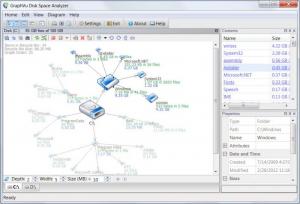
The interface of Disk Space Analyzer can display all the files and folders in a graphical way. When the program is launched for the first time, it automatically scans every single file and folder contained by the hard disk, no matter how many partitions there are. After this process is over, Disk Space Analyzer will display every file and folder together with the space they take up, in an intuitive way. Even hidden system files and folders are displayed. Thus, the user can quickly see which files and folders take the most hard disk space and he can delete them in case they are not needed by the operating system or installed programs.
Displayed files and folders can be printed directly, to be analyzed later on. Any file and folder which is not needed can be moved to the Recycle Bin or it can be deleted completely. There are a few options available for narrowing the number of files displayed. As such, the minimum space occupied by a file can be set and also the depth and width.
Pros
It can display all the files and folders stored on the hard disk in a graphical and intuitive way, allowing the user to quickly spot the files that take up most hard disk space. Besides that, some conditions can be applied, for narrowing the number of files displayed. Furthermore, the program can delete files and folders by moving them to the Recycle Bin or directly removing them.

Cons
The number of options, for example, the number of displaying modes for files and folders, is a bit limited. Disk Space Analyzer is a nice software that lets you quickly see which files and folders take up the most hard disk space.

Disk Space Analyzer
1.1 revision 1658
Download
Disk Space Analyzer Awards

Disk Space Analyzer Editor’s Review Rating
Disk Space Analyzer has been reviewed by Jerome Johnston on 05 Mar 2012. Based on the user interface, features and complexity, Findmysoft has rated Disk Space Analyzer 4 out of 5 stars, naming it Excellent







